










SEO: Custom Static HTML API
Search engines index the HTML your server returns. The SiteTran widget can translate a page in the browser, but crawlers often never run that JavaScript. If you want translated pages to rank, each language needs its own URL and that URL needs to return already-translated HTML.
This API does that. You send SiteTran the original page URL and a language code. SiteTran loads that page, applies your published translations, and returns a full HTML snapshot. Your backend then serves that HTML at language URLs such as https://www.example.com/es/about or https://es.example.com/about.
You may also see this called the Static API or the Translation SEO API. They all refer to this same endpoint: /api/get-static-translation.
When to use this API
Use it when you control your backend and want language URLs that return translated HTML. That includes subdirectories like /es/, subdomains like es.example.com, or another custom scheme.
Language subdomains still need this API. sitetran.url_type = "sub.domain" only tells the widget to use those URLs. Your server still has to return translated HTML at es.example.com. See How do I get the Full Benefits of International SEO? for the widget option and DNS setup.
Use something else when:
- You only need on-page translation for visitors, not indexable translated URLs. The widget is enough.
- You use the WordPress plugin. Enable SEO there instead of calling this API yourself. See Enabling SEO on your WordPress Site.
How a request works
- A visitor or crawler requests
https://www.example.com/es/about. - Your server maps that to the original page,
https://www.example.com/about. - If you already have a cached snapshot for that URL and language, you return it.
- Otherwise your server calls this API with that original URL and
language_code=es. - SiteTran fetches the original page, applies published translations, and returns HTML.
- Your server caches that HTML and responds with
Content-Type: text/html.
SiteTran fetches the url you pass. That page must already include the SiteTran widget, and it must be reachable from the internet.
Prerequisites
- The SiteTran widget is on the original-language pages you will translate. See How do I Integrate my Website With SiteTran?.
- The target language is live on your site, and the translations you care about are published. See My New Translations or Changes Aren’t Appearing on my Website.
- You can generate an auth key from Site Manager.
- Your backend can route language URLs and return HTML.
- SiteTran can fetch the original page. If you use Cloudflare or similar bot protection, allowlist SiteTran's IP. See Fix Cloudflare Bot Blocking for Translation SEO.
Generate an Auth Key
Call this API from your server, never from the browser. The auth key is a secret. Anyone with it can generate billed Static API requests for your site.
- Open your site in Site Manager.
- Go to Settings ➞ Auth Keys.
- Click Generate New Key.
- Give the key a name you will recognize, such as "Static translation API".
- Copy the key and store it in server-side environment configuration. You will not be able to view the full key again later.
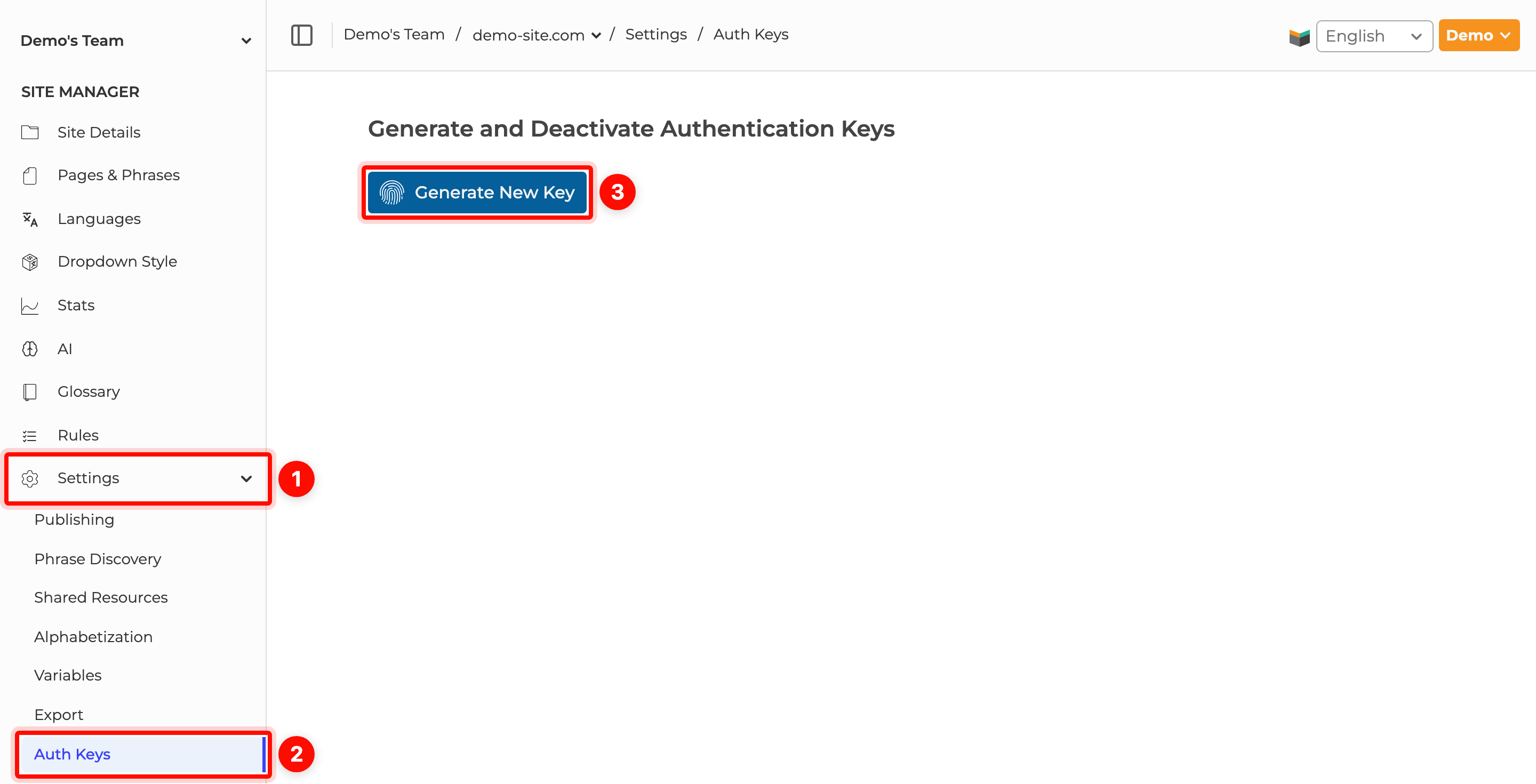
If a key is leaked, remove it on the Auth Keys page so it stops working, then generate a new one.
Endpoint
GET or POST https://www.sitetran.com/api/get-static-translationPass parameters in the query string for GET or POST, or in a JSON body for POST. Send html only in the POST body.
| Parameter | Required | Description |
|---|---|---|
auth_key |
Yes | An active auth key from Settings ➞ Auth Keys for this site. |
language_code |
Yes | The target language, using the same code as in SiteTran. Examples: es, de, pt, zh-CN. |
url |
Yes, unless sending html |
Recommended even when sending HTML. The publicly reachable original-language page, including the path and any query string the page needs. Do not pass the translated subdirectory or subdomain URL. Do not include a hash fragment. |
html |
No | Raw page HTML including your SiteTran widget, mainly for testing and QA. See the example below. |
A successful response is the translated page HTML with Content-Type: text/html. It is not JSON.
While SiteTran builds the snapshot, non-SiteTran JavaScript on the source page does not run. Those scripts are blocked for the snapshot, then put back in the HTML we return. They run when the page loads for your visitor, so the page still behaves as you expect. The SiteTran widget does run during the snapshot so published translations can be applied.
Example request
curl -G "https://www.sitetran.com/api/get-static-translation" \
  --data-urlencode "auth_key=YOUR_AUTH_KEY" \
  --data-urlencode "language_code=es" \
  --data-urlencode "url=https://www.example.com/about"
In Node.js:
const axios = require("axios");

const response = await axios.get("https://www.sitetran.com/api/get-static-translation", {
  params: {
    auth_key: process.env.SITETRAN_AUTH_KEY,
    language_code: "es",
    url: "https://www.example.com/about"
  }
});

// response.data is the translated HTML string
When passing url in a query string, URL-encode it. If you concatenate strings, use encodeURIComponent.
Send raw HTML for testing and QA
For non-production testing and QA, you can send page HTML instead of having SiteTran fetch it from the URL. Use POST to the same endpoint, with a non-empty html string in the JSON body. The HTML must include your SiteTran widget.
Still pass the original page's url so relative assets and page-specific rules resolve correctly. If omitted, it defaults to your site's URL saved in SiteTran, which may differ from the page you are testing.
const response = await axios.post("https://www.sitetran.com/api/get-static-translation", {
  auth_key: process.env.SITETRAN_AUTH_KEY,
  language_code: "es",
  url: "https://www.example.com/about",
  html: `<!doctype html>
<html lang="en">
  <head><meta charset="utf-8"><title>Hello World</title></head>
  <body>
    <h1>Hello World</h1>
    <script>var sitetran = { site_id: 1234 };</script>
    <script src="https://c.sitetran.com/widget/v3.js"></script>
  </body>
</html>`
});
The JSON payload containing html, url, and language_code must fit within 2 MiB, including JSON escaping; invalid or oversized HTML returns 400. Referenced assets must still be accessible to SiteTran.
POST also works for normal production URL requests: omit html and send auth_key, language_code, and url in either the query string (no body needed) or a JSON body. It fetches the page just like GET.
Serve language URLs
Your backend should recognize the language from the URL, then fetch or cache the original page's translated HTML. For subdirectories, the first path segment is the language code. For subdomains, the language is in the hostname, and you still pass the original-language page as url.
A typical mapping:
| Requested URL | Original url sent to the API |
language_code |
|---|---|---|
https://www.example.com/es/about |
https://www.example.com/about |
es |
https://www.example.com/de/ |
https://www.example.com/ |
de |
https://es.example.com/about |
https://www.example.com/about |
es |
https://www.example.com/about |
Do not call the API | Original language |
The Express example below is for subdirectories. For subdomains, route on the hostname instead of the first path segment, then call the same API.
const express = require("express");
const axios = require("axios");

const app = express();
const LIVE_LANGUAGES = new Set(["es", "de", "pt"]);
const SOURCE_ORIGIN = "https://www.example.com";
const cache = new Map();

async function getStaticTranslation(sourceUrl, languageCode) {
  const cacheKey = languageCode + ":" + sourceUrl;
  if (cache.has(cacheKey)) return cache.get(cacheKey);

  const response = await axios.get("https://www.sitetran.com/api/get-static-translation", {
    params: {
      auth_key: process.env.SITETRAN_AUTH_KEY,
      language_code: languageCode,
      url: sourceUrl
    }
  });

  cache.set(cacheKey, response.data);
  return response.data;
}

app.use(async function (req, res, next) {
  const parts = req.path.split("/");
  const languageCode = parts[1];
  if (!LIVE_LANGUAGES.has(languageCode)) return next();

  const pagePath = "/" + parts.slice(2).join("/");
  const sourceUrl = SOURCE_ORIGIN + (pagePath === "/" ? "/" : pagePath);

  try {
    const html = await getStaticTranslation(sourceUrl, languageCode);
    res.type("html").send(html);
  } catch (err) {
    console.error("SiteTran static translation failed", err.message);
    next();
  }
});
If the API call fails, falling through to the original page is usually better than returning a 500. The widget can still translate in the browser, but that fallback is not what you want search engines to index long term.
You can also generate these HTML files at build time and serve them from disk or a CDN. Each API call during the build still counts as a Static API request.
Cache the HTML on your side
SiteTran does not cache the HTML for you. Each successful call is a billed Static API request, and building the snapshot can take several seconds because SiteTran has to load and translate the live page.
Cache by original URL plus language code. Serve cache hits immediately. Refresh the cache when you publish translations, when the original page content changes, or on a schedule that matches how often those pages change.
Do not cache personalized pages. If a URL includes a signed-in dashboard, account details, or other user-specific HTML, either skip the API for that URL or pass only a logged-out version. Cached personal content can leak from one visitor to another.
Keep the language dropdown and hreflang in sync
Serving translated HTML is only half of the SEO setup. The widget still needs to know the static URL for each language of the current page, so language changes go to /es/about or es.example.com/about instead of translating /about in place.
Set this on the original page (the API snapshot will include it):
sitetran.static_url_language_code_lookup = {
  "en": "https://www.example.com/about",
  "es": "https://www.example.com/es/about",
  "de": "https://www.example.com/de/about",
  "pt": "https://www.example.com/pt/about"
};
Build that object per page. A homepage-only lookup will send every language change back to the homepage.
When this lookup is present, the widget also adds <link rel="alternate" hreflang="..."> tags for those URLs, unless a matching hreflang already exists. If you already output hreflang in your backend, you can leave the lookup for redirects only and set sitetran.update_page_hreflangs = false. See Widget Initialization Options.
If the visitor picks a live language that is not in the lookup, the widget sends them to the original-language URL from the lookup and then translates in the browser.
The widget option reference for this lookup is also in SEO: Language Codes as Subdirectories.
Allowlist SiteTran so it can fetch your pages
The API has to request your original page. If Cloudflare, a WAF, or another bot challenge returns a captcha or "Just a moment" page, SiteTran cannot translate the real content.
Allowlist this IP for origin HTML access: 54.87.171.204
That is the IP that fetches your site. It is not the IP you call. Your server still makes HTTPS requests to www.sitetran.com.
Read the full allowlist steps in Fix Cloudflare Bot Blocking for Translation SEO.
Errors
| HTTP status | Meaning | What to do |
|---|---|---|
200 |
Translated HTML body | Cache and serve it as text/html. |
403 |
The auth key is missing, inactive, wrong, or the site was deleted | Generate a new key in Settings ➞ Auth Keys. Do not retry with the same key. |
500 |
SiteTran could not fetch or translate the page | The JSON body includes error and usually body. Confirm the url loads without a captcha, the widget is on that page, and the language code is live. |
Failed requests are not counted as Static API usage. Successful requests are counted even if you decide not to cache the HTML.
Usage
Each successful call counts as one Static API request on the site that owns the auth key. Plans include a number of these requests. Extra requests can create usage charges.
The practical way to control cost is to cache. One cached snapshot can be served to every visitor and crawler until you refresh it. Calling the API on every page view is slow and expensive.
Limitations
- When fetching a page by
url, it must be publicly reachable.localhostand private-network URLs will fail. To test a local page this way, expose it with a tunnel such as ngrok and pass that public URL. - Pass the original-language page, not
/es/.... Sending an already-translated URL can produce a bad snapshot. - Only published translations appear in the HTML. Unpublished translator work will not be in the snapshot.
- The snapshot is the page as it exists after SiteTran applies translations, without running your other scripts. Content those scripts would have added may be missing from the static HTML. When a visitor loads the page, those scripts run. The widget remains on the page and can still translate known phrases that appear later. New phrases are not discovered from the static snapshot.
- Discover new source phrases on original-language pages, not by depending on the static translated URLs.
- Do not call this API from frontend JavaScript. That would expose the auth key.
- Serve the returned HTML as HTML. Do not strip SiteTran widget tags, attributes, or scripts from the snapshot.
- Refresh your cache after you publish translations. Otherwise crawlers keep seeing the old snapshot.